create
Piano
Play tunes on a real playable keyboard!
Tap the colorful bars to make music!
Free to play · No ads · No sign-up
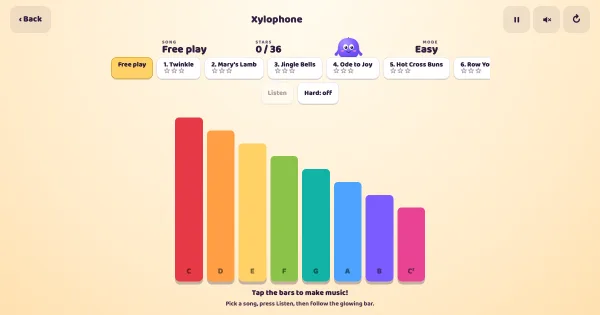
The Xylophone lets little musicians make real music right in the browser. Tap the bright rainbow bars to play notes, or pick a song such as Twinkle Twinkle Little Star, Hot Cross Buns or Old MacDonald, press Listen, and follow the glowing bar. There's no wrong way to play in Free Play mode: just tap, listen and create. A joyful introduction to music, melody and rhythm.
Xylophone is one of our free music & art games for kids — play it right here in your browser, or browse all our free online games. It is also in our 1 player games for kids collection.
The Xylophone teaches listening and the idea that sounds can be high or low. Each bar plays its own note, with the short bars high and the long bars low, so a child connects size, position and pitch the way a real xylophone works.
Song mode adds following a tune: pick a song, press Listen to hear it, then follow the glowing bar note by note. The songs are ones children already know, including Twinkle Twinkle Little Star, Hot Cross Buns, Jingle Bells, London Bridge, Old MacDonald, Ode to Joy and Row, Row, Row Your Boat. Free Play has no wrong notes at all.
Works from age 3 to 12. Three- and four-year-olds enjoy Free Play and the glowing guide. From about five, children can follow a whole song. Older children can switch the Hard setting on and try to play a tune without the glow.
Start with Hot Cross Buns. It only uses three notes, so a young child can play the whole song quickly.
Sing along as they play. Hearing the words with the notes helps them remember the tune.
Turn the sound up before starting; the game is all about listening.
Yes — Xylophone is completely free to play here in your browser. There's no sign-up, no download and nothing to buy.
Tap the colored bars. Turn your sound on! Tap any colored bar to play its note.
No. Xylophone runs in any web browser on a phone, tablet or computer — just open the page and play. Nothing installs.
Xylophone is made for ages 3 to 12. It helps children practise listening to a short tune and playing it back and hearing high and low notes while they play.
Play tunes on a real playable keyboard!
Tap squares to build your own loop of music
Fill the pictures with any colors you like!
Flip the cards and match the musical notes!
Drag the shapes to build a rocket!
Connect the numbered dots to reveal a picture!
Math, reading, spelling, flashcards and coloring pages — all free in our Learning Center.