puzzles
Tetris
Stack the falling blocks and clear the lines!
Stack the blocks to build the tallest tower!
 iPhone & iPad

In the app
It plays offline, there are no ads, and you pay once.
Free download with 33 games. A one-time $9.99 unlock opens Tower Stack and 73 more; no subscription, and the purchase sits behind a grown-up check.
Download on the App StoreWant to play something right now? These are free here:
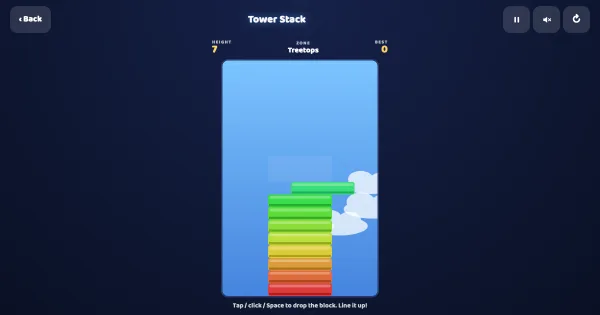
Tower Stack is all about timing and a steady hand. A block swings back and forth at the top of the screen, and one tap drops it onto the stack below. Land it dead-on and the whole block sticks; drop it a little off and the overhang is sliced away, leaving you less room for the next one. Every block makes the tower taller and a touch more precarious — how high can you climb before the blocks shrink to a sliver? It's simple to pick up and strangely hard to walk away from.
Tower Stack is one of our arcade & reflex games for kids. This one plays in the iPhone and iPad app rather than in the browser, but 33 of our games are free to play right here — browse the full library to find them. It is also in our 1 player games for kids collection.
Tower Stack is mostly for fun, but it still asks something of a child:
Tower Stack is part of Pibbit, our app for iPhone and iPad. The app is free to download and 33 of its games are free; Tower Stack is one of the 74 that open with a single $9.99 purchase. You pay once, there is no subscription, and the purchase sits behind a grown-up check.
Not on the website. Tower Stack plays in the Pibbit app, where it works offline and has no ads. If you want something to play in the browser right now, Tetris, Snake and Whack-a-Mole are free on this site.
Tap, click, or press Space to drop. A block slides left and right above the tower.
Tower Stack is made for ages 6 to 12. It helps children practise timing a drop so the blocks line up while they play.
Stack the falling blocks and clear the lines!
Eat, grow longer, and don't crash into yourself!
Tap the moles as fast as you can!
Pop as many floating bubbles as you can!
How fast can you tap when the screen turns green?
Tap to flap and fly through the pipes!
Math, reading, spelling, flashcards and coloring pages — all free in our Learning Center.