create
Xylophone
Tap the colorful bars to make music!
Play tunes on a real playable keyboard!
 iPhone & iPad
In the app
It plays offline, there are no ads, and you pay once.
Free download with 33 games. A one-time $9.99 unlock opens Piano and 73 more; no subscription, and the purchase sits behind a grown-up check.
Download on the App StoreWant to play something right now? These are free here:
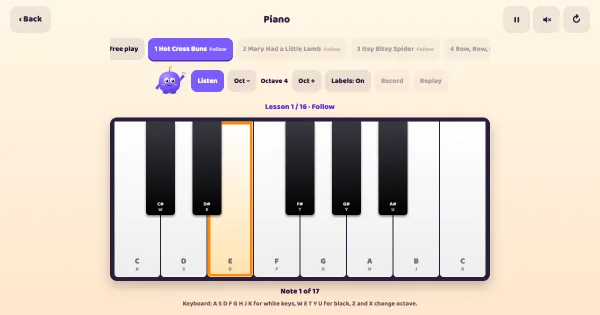
Piano turns your screen into a colorful keyboard you can actually play. Tap the white and black keys to hear real musical notes, or use your computer keyboard to perform. The note names are shown on the keys to help beginners learn, and you can hide them once you know your way around. A wonderful first step into music and rhythm for curious kids.
Piano is one of our music & art games for kids. This one plays in the iPhone and iPad app rather than in the browser, but 33 of our games are free to play right here — browse the full library to find them. It is also in our 1 player games for kids collection.
Piano is a first music lesson without the lesson. Each key plays a real note, and the note names are printed on the keys, so a child can link the letter C to a sound and a place on the keyboard. That link between a symbol, a sound and a position is the same one they will later use when reading notes on a page.
The five built-in songs (Twinkle Twinkle Little Star, Mary Had a Little Lamb, Hot Cross Buns, Ode to Joy and Jingle Bells) give them something to aim for. Following a tune key by key trains listening, sequencing and the patience to get a phrase right, and the Record button lets them play back what they made and hear whether it sounded the way they meant.
Three- and four-year-olds mostly enjoy tapping and hearing what happens, which is exactly right for them; leave the labels on. From about five, a child can follow the song mode note by note. Older children can switch the labels off, move up or down an octave, and try to pick out tunes they know by ear. It works on phones and tablets (tap the keys) and on computers, where the A to K keys on the keyboard play the white notes.
Start with Hot Cross Buns: it uses only three notes, so a young child can learn it in one sitting and feel like they can play the piano.
Ask them to record a short tune and play it back to you. Hearing their own recording is often what makes a child want to try again and do it better.
If you have a real keyboard at home, play the same song side by side. The notes are in the same order, so what they learn here carries over.
Piano is part of Pibbit, our app for iPhone and iPad. The app is free to download and 33 of its games are free; Piano is one of the 74 that open with a single $9.99 purchase. You pay once, there is no subscription, and the purchase sits behind a grown-up check.
Not on the website. Piano plays in the Pibbit app, where it works offline and has no ads. If you want something to play in the browser right now, Xylophone, Coloring Book and Dot to Dot are free on this site.
Tap the keys, or use the A–K keyboard row. Tap the white and black keys to play notes.
Piano is made for ages 3 to 12. It helps children practise following a simple tune note by note and hearing notes go higher and lower while they play.
Tap the colorful bars to make music!
Tap squares to build your own loop of music
Fill the pictures with any colors you like!
Flip the cards and match the musical notes!
Drag the shapes to build a rocket!
Connect the numbered dots to reveal a picture!
Math, reading, spelling, flashcards and coloring pages — all free in our Learning Center.