science New
Pibbit's Greenhouse
Plant a seed, turn the days, and watch it grow
Build a machine, test it, fix it, deliver the goods
 iPhone & iPad

In the app
It plays offline, there are no ads, and you pay once.
Free download with 33 games. A one-time $9.99 unlock opens Pibbit's Workshop and 73 more; no subscription, and the purchase sits behind a grown-up check.
Download on the App StoreWant to play something right now? These are free here:
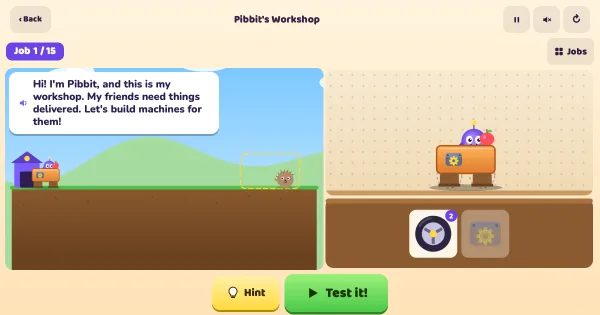
Pibbit's friends keep asking for deliveries: an apple for Hedgehog, a fish across the ice for Penguin, a birthday cake over a hill, a gap and a frozen pond. Your child bolts wheels, motors, fans, balloons, springs and sandbags onto Pibbit's cart, presses Test and watches what really happens. Machines that fail do it in a way that teaches something: the motor spins uselessly on ice, one motor stalls on the hill, too many balloons float right over the friend. The build stays put, so the next try is a small change, not a fresh start. Fifteen jobs, then a free-build track.
Pibbit's Workshop is one of our science & nature games for kids. This one plays in the iPhone and iPad app rather than in the browser, but 33 of our games are free to play right here — browse the full library to find them.
Pibbit's Workshop is a small physics lab dressed up as a delivery service. Every part does exactly one thing, and the jobs are built so that the first idea most children try fails in a way they can see: the cart scrapes along without wheels, one motor gives up halfway up the hill, the wheels spin on the ice while the fan just pushes. That is the design cycle engineers use (build, test, look at why it failed, change something) and it is what the early-years engineering standards ask children to practise.
Later jobs need two ideas at once. The cliff needs lift and a push; the dock needs the cart to slow down before the water, which one balloon or a single wheel will do; the last job combines a hill, a gap and ice. Every job was checked by a solver that tries every build the bench allows, so each one has an answer, and the hardest has only two out of 144 possible machines.
For teachers and homeschooling parents, here is where Pibbit's Workshop lines up with what children are taught at school:
Best for ages 6 to 10. The first five jobs are fixes to an almost-working cart and are fine for a five-year-old with a grown-up nearby; everything is spoken, so reading isn't needed. The last few jobs make most 9-year-olds stop and think, and the free-build track keeps older children experimenting.
Ask "what do you think will happen?" before they press Test, then "was that what you expected?" after.
When a test fails, ask what Pibbit said went wrong before reaching for the Hint button.
Try a wrong machine on purpose together, just to see what it does. Failing on purpose is a good experiment.
Pibbit's Workshop is part of Pibbit, our app for iPhone and iPad. The app is free to download and 33 of its games are free; Pibbit's Workshop is one of the 74 that open with a single $9.99 purchase. You pay once, there is no subscription, and the purchase sits behind a grown-up check.
Not on the website. Pibbit's Workshop plays in the Pibbit app, where it works offline and has no ads. If you want something to play in the browser right now, Sink or Float Lab, 2048 and Tetris are free on this site.
Drag parts onto the cart (or tap a part to add it), then press Test it! Listen to the job, or tap the picture at the top to hear it again.
Pibbit's Workshop is made for ages 6 to 12. It helps children practise forces: pushes, lift, friction and weight and the engineering cycle: build, test, find out why, improve while they play.
Plant a seed, turn the days, and watch it grow
Guess first, then drop it in the tub and see
Drag the shapes to build a rocket!
Write the code, watch the critter follow it!
Swap the tiles to rebuild the picture!
Fling balls to knock down towers of blocks
Math, reading, spelling, flashcards and coloring pages — all free in our Learning Center.