words
Word Guess
Guess the hidden word one letter at a time!
Type the falling letters before they land!
 iPhone & iPad

In the app
It plays offline, there are no ads, and you pay once.
Free download with 33 games. A one-time $9.99 unlock opens Typing Stars and 73 more; no subscription, and the purchase sits behind a grown-up check.
Download on the App StoreWant to play something right now? These are free here:
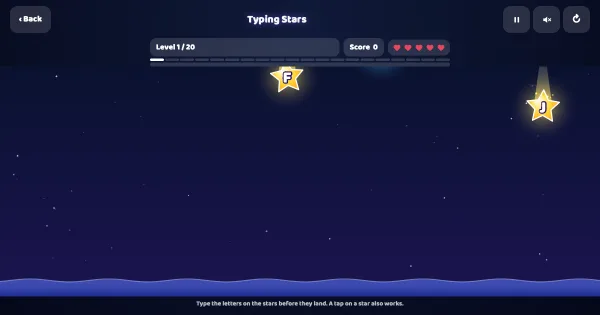
Typing Stars turns learning the keyboard into a starry arcade challenge. Glowing letter-stars drift down from the top of the screen — press the matching key (or tap the star) to zap it before it reaches the bottom. Miss too many and the round ends. The stars fall faster as your score climbs, making it a fun and sneaky way to build typing speed and letter recognition.
Typing Stars is one of our words & letters games for kids. This one plays in the iPhone and iPad app rather than in the browser, but 33 of our games are free to play right here — browse the full library to find them. It is also in our 1 player games for kids collection.
Typing Stars teaches touch typing one step at a time. The early levels use only the home row, then add the top row, then every letter, then short words and longer ones over twenty levels. Pressing the right key without looking for it is a skill children will use for the rest of their school life, and it is far easier to learn it properly at eight than to unlearn hunt-and-peck at twelve.
Letters fall faster as the score climbs, which keeps practice interesting, and every key press reinforces letter recognition, both upper and lower case.
Best for ages 6 to 12, played on a computer with a real keyboard. Six- and seven-year-olds can manage the home-row levels; the word levels suit children who are already reading comfortably, usually from eight. On a touch screen children can tap the stars instead, which practises letter recognition but not typing.
Show them where to rest their fingers: F and J have small bumps for the index fingers. That one habit makes everything else easier.
Encourage accuracy over speed. Speed comes on its own once the fingers know where to go.
Ten minutes a few times a week is better than an hour once.
Typing Stars is part of Pibbit, our app for iPhone and iPad. The app is free to download and 33 of its games are free; Typing Stars is one of the 74 that open with a single $9.99 purchase. You pay once, there is no subscription, and the purchase sits behind a grown-up check.
Not on the website. Typing Stars plays in the Pibbit app, where it works offline and has no ads. If you want something to play in the browser right now, Word Search, Word Wheel and Word Grid are free on this site.
Press the matching letter key, or tap the star. Watch the letter-stars fall from the top.
Typing Stars is made for ages 6 to 12. It helps children practise finding letters on a real keyboard, when played on a computer and recognising capital letters quickly while they play.
Guess the hidden word one letter at a time!
Unscramble the mixed-up letters into a word!
Find all the hidden words in the letter grid!
Hear the word, then pop the match!
Steer a hungry monster to catch the right letter or number
Swipe the wheel, spell words, fill the crossword
Math, reading, spelling, flashcards and coloring pages — all free in our Learning Center.