numbers
Counting Fun
Count the objects and pick the right number!
Fill Pibbit's battery and learn what ten looks like
Free to play · No ads · No sign-up
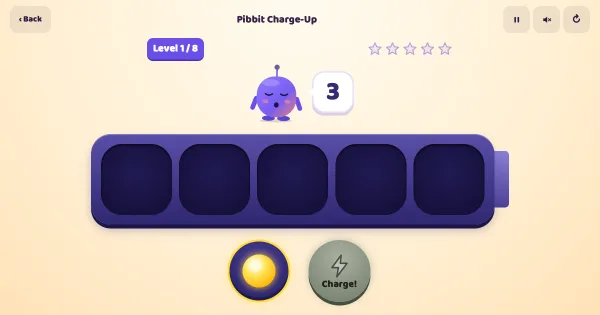
Pibbit the robot has run flat, and his battery is a ten-frame: two rows of five. He asks for seven sparks, your child drags them in, and the battery fills the way a teacher fills a ten-frame, top row first. Press Charge and Pibbit wakes up and does a trick that gets bigger with the charge, from a wiggle at two to a full light show at ten. Later he flashes his battery for a second and asks how many sparks were there, asks how many more make ten, and needs teen numbers built from a ten pack and a few extra sparks. Every line is spoken, so no reading is needed, and a wrong charge is never marked wrong: Pibbit just counts the battery out loud with your child and lets them fix it.
Pibbit Charge-Up is one of our free numbers & maths games for kids — play it right here in your browser, or browse all our free online games.
Pibbit Charge-Up is built around the ten-frame, the two-rows-of-five grid that kindergarten and first-grade classrooms use to make numbers visible. Sparks always fill the top row first, so seven always looks the same: one full row and two more. After a few rounds most children stop counting from one and start seeing the five inside the number, which is the step that makes adding in your head possible later.
The levels move through four ideas teachers care about. First, making an amount (cardinality). Then Quick Look rounds, where the battery flashes for a moment and the child says how many, which trains subitizing. Then the pairs that make ten ("I have six, how many more make ten?"). Last, teen numbers built as a ten pack plus extra sparks, so fourteen is heard and seen as ten and four.
For teachers and homeschooling parents, here is where Pibbit Charge-Up lines up with what children are taught at school:
Levels 1 to 4 are for ages 3 to 5: small numbers, everything spoken aloud, no timer and no way to fail. Levels 5 to 8 suit 5- to 7-year-olds in kindergarten and first grade, where making ten and teen numbers are on the curriculum. A grown-up can start any level from the opening screen, so an older child can skip straight to the make-ten rounds.
Keep an egg carton or an ice-cube tray handy. Cut it to two rows of five and you have a real ten-frame for the kitchen table.
Ask "how many empty spaces?" as often as "how many sparks?". The empty spaces are where the make-ten facts live.
Short and often works best. One level a day is about five minutes.
Yes — Pibbit Charge-Up is completely free to play here in your browser. There's no sign-up, no download and nothing to buy.
Drag or tap sparks into the battery, tap the Charge button, tap a number to answer. Listen to how many sparks Pibbit needs. Tap him or his speech bubble to hear it again.
No. Pibbit Charge-Up runs in any web browser on a phone, tablet or computer — just open the page and play. Nothing installs.
Pibbit Charge-Up is made for ages 3 to 8. It helps children practise counting and building amounts up to 20 and seeing small amounts at a glance without counting (subitizing) while they play.
Count the objects and pick the right number!
Tap each one and count out loud together!
Connect the numbered dots to reveal a picture!
Practise number facts, then race the clock when ready
Pop the balloon with the right answer!
Pack cookies into boxes and crates to learn place value
Math, reading, spelling, flashcards and coloring pages — all free in our Learning Center.